
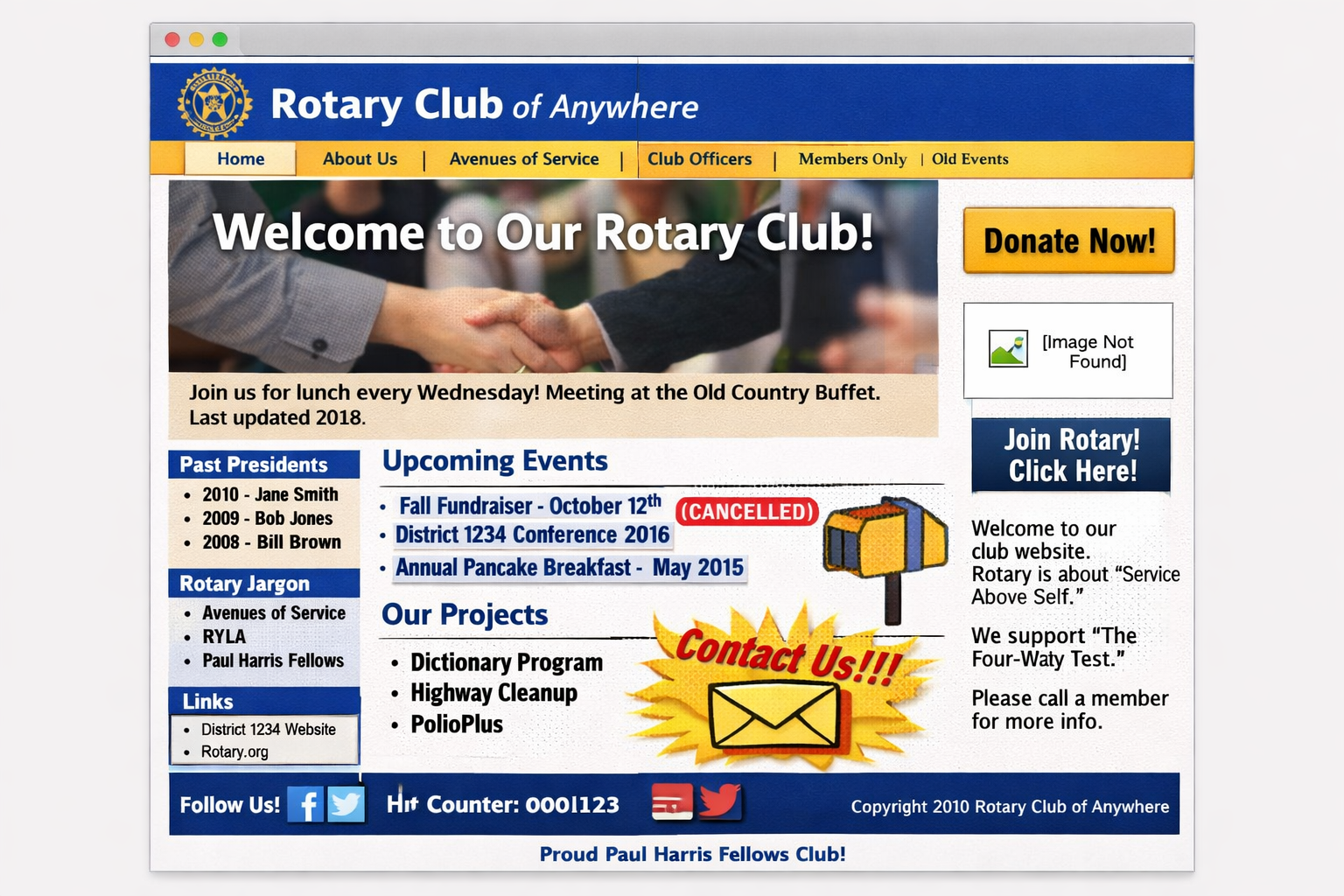
A Rotary club website should do one primary thing well: attract, inform, and convert visitors into engaged members, partners, or supporters. Yet many club websites unintentionally create confusion, miss opportunities, or fail to reflect the professionalism of Rotary.
The good news? Most of these issues are easy to fix—especially by leveraging Rotary’s excellent public image resources.
1. No Clear Call to Action
The mistake:
Visitors land on your homepage and don’t know what to do next.
Fix:
Every page—especially your homepage—should answer:
- How do I visit?
- How do I join?
- How do I contact you?
Use clear buttons like:
- Visit a Meeting
- Join Rotary
- Contact Us
2. Outdated Content
The mistake:
Old events, outdated officer lists, and stale announcements.
Why it matters:
An outdated website signals an inactive club—even when that’s not true.
Fix:
- Update events monthly
- Keep leadership current
- Assign a dedicated website owner
3. Too Much Rotary Jargon
The mistake:
Using insider language like:
- “Avenues of Service”
- “District Grants”
- “Paul Harris Fellow”
Fix:
Write for someone who has never heard of Rotary:
- Keep language simple
- Focus on impact
- Explain terms when needed
4. No Clear Meeting Information
The mistake:
Visitors can’t easily find when and where you meet.
Fix:
Prominently display:
- Day and time
- Location (with map)
- Whether guests are welcome
Add a “What to Expect” section to make visiting feel easy and welcoming.
5. Poor Mobile Experience
The mistake:
The site works on desktop but is frustrating on a phone.
Fix:
- Use a mobile-friendly design
- Simplify menus
- Test regularly on your own device
6. Lack of Photos (or Poor-Quality Photos)
The mistake:
Using stock images—or none at all.
Fix:
Use real photos of:
- Your members
- Service projects
- Community impact
Authentic images build trust and connection.
7. No Storytelling
The mistake:
Listing activities instead of telling meaningful stories.
Fix:
Turn activities into impact stories:
Instead of:
“Dictionary distribution to 3rd graders”
Say:
“Each year, we put a dictionary into the hands of every 3rd grader in our community—helping them build confidence and a lifelong love of learning.”
8. Hidden Contact Information
The mistake:
No easy way for someone to reach your club.
Fix:
Include:
- Contact form
- Email address
- Optional phone number
Make it easy for prospective members, speakers, and partners to connect.
9. Ignoring Rotary Public Image Standards
The mistake:
Inconsistent logos, incorrect colors, outdated branding, or homemade graphics.
Why it matters:
Your website represents not just your club—but all of Rotary.
Fix:
Follow official Rotary branding guidelines and use approved tools:
- Use official logo formats and color palettes
- Maintain consistent fonts and layouts
- Avoid stretching or modifying the Rotary wheel
Leverage these excellent resources:
- Rotary’s official templates: https://brandcenter.rotary.org/en-us/templates
- Zone public image tools: https://zone2627.org/public-image/
These tools make it easy to create professional, consistent, and compelling visuals—even without design experience.
10. Treating the Website Like a Bulletin Board Instead of a Marketing Tool
The mistake:
Using the website only for internal communication.
Fix:
Shift your mindset:
Your website is your front door to the community.
It should:
- Inspire visitors
- Clearly explain what Rotary does
- Invite people to engage
Final Thought
Rotary clubs are doing incredible work—but too often, their websites don’t reflect that impact.
By avoiding these common mistakes and using Rotary’s public image standards and templates, your website can become one of your most powerful tools for:
- Membership growth
- Community awareness
- Stronger engagement
A great Rotary website doesn’t need to be complicated. It just needs to be:
Clear. Current. Consistent. And compelling.

About Garry Heath
Garry Heath is an IT, business operations, and digital strategy consultant and longtime Rotarian. He helps Rotary clubs and districts improve their websites to attract members, tell their story, and strengthen their public image. If your club’s website needs a refresh, Garry offers practical, affordable guidance to help you make it a powerful tool for growth.
Comments are closed